Acorive Brand Palette.
.
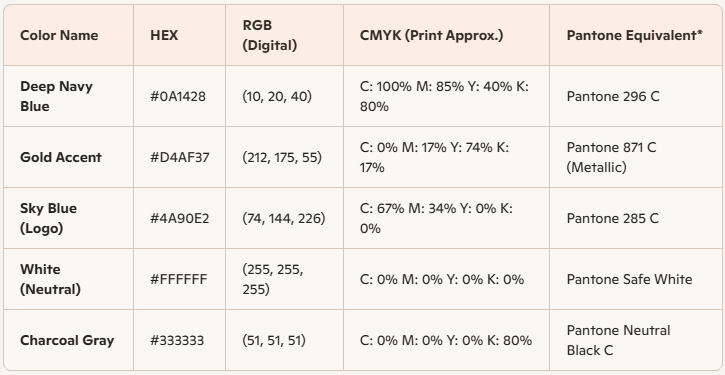
Acorive Brand Palette Usage Guide
1. Primary Colours
- Deep Navy Blue (#0A1428 | RGB 10,20,40 | CMYK 100,85,40,80 | Pantone 296 C)
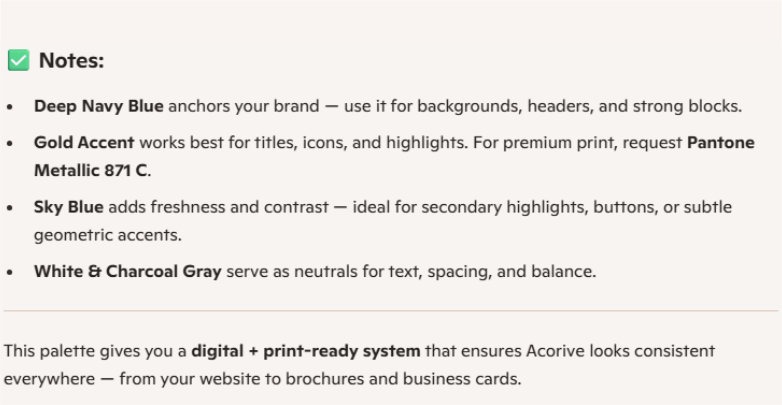
- Use for: Backgrounds, headers, footers, large blocks, and dominant sections.
- Avoid: Small text (too dark for readability).
- Gold Accent (#D4AF37 | RGB 212,175,55 | CMYK 0,17,74,17 | Pantone 871 C Metallic)
- Use for: Titles, icons, highlights, borders, and call‑outs.
- Avoid: Large text blocks (can strain readability).
2. Secondary Colours
- Sky Blue (#4A90E2 | RGB 74,144,226 | CMYK 67,34,0,0 | Pantone 285 C)
- Use for: Buttons, links, subtle geometric accents, and secondary highlights.
- Avoid: Overuse — keep it as a complementary accent.
- White (#FFFFFF | CMYK 0,0,0,0)
- Use for: Body text on navy backgrounds, spacing, and clean sections.
- Avoid: Thin outlines (may disappear in print).
- Charcoal Gray (#333333 | RGB 51,51,51 | CMYK 0,0,0,80 | Pantone Neutral Black C)
- Use for: Body text on light backgrounds, secondary text, and neutral dividers.
3. Application Checklist
- Headings & Titles: Gold on navy backgrounds.
- Body Text: White on navy OR charcoal on white.
- Buttons: Sky blue with white text (primary CTA), gold with navy text (secondary CTA).
- Icons: Gold line icons with consistent stroke thickness and rounded corners.
- Backgrounds: Deep navy with subtle geometric patterns; use sky blue accents sparingly.
- Print Materials:
- Navy as a dominant base.
- Gold as metallic ink (Pantone 871 C) for premium finishes.
- Sky blue for highlights (Pantone 285 C).
4. Best Practices
- Maintain high contrast (gold/white on navy, navy on white).
- Use consistent proportions: navy 60%, gold 20%, sky blue 10%, neutrals 10%.
- For premium print jobs, specify Pantone colours to ensure accuracy.
- For digital assets, stick to HEX/RGB values for consistency across screens.
Acorive Branded Fonts & Templates
Letterhead Standard
Header Bar (Top):
- Deep Navy Blue background (#0A1A3F). CMYK 80%, 80%, 0%, 80%
- Logo (gold “Acorive” with sky‑blue magnifying glass) aligned left.
- Tagline “Tax Investigation & Dispute Specialists” in Open Sans, white, aligned right.
Body Section:
- Font: Open Sans, 11 pt, black text on white background.
- Headings: Trebuchet MS, 14 pt, bold, gold accent.
- Sub‑headings: Trebuchet MS, 12 pt, semi‑bold, navy.
- Margins: 1 inch all sides.
Footer Bar (Bottom):
- Navy background with white text.
- Contact details (address, phone, email, website) in Open Sans, 9 pt.
- Optional sky‑blue line separator above footer for visual balance.
Email Layout Standard
- Subject Line: Trebuchet MS, bold, navy.
- Greeting & Body: Open Sans, 11 pt, black text on white background.
- Headings/Sub‑sections: Trebuchet MS, bold, gold accent.
- Signature Block:
- Name in Trebuchet MS, bold, gold.
- Title & contact details in Open Sans, 10 pt, navy.
- Logo (small version) aligned right or centred.
Colour Usage
RGB
- Primary: Deep Navy Blue (10.10.50.1).
- Secondary: Gold (#D4AF37).
- Accent: Sky Blue (#87CEEB).
- Neutral: White (#FFFFFF).
CMYK
- Primary: Deep Navy Blue (#0A1A3F).
- Secondary: Gold (#D4AF37).
- Accent: Sky Blue (#87CEEB).
- Neutral: White (#FFFFFF).
How do I change style options?
Lorem Ipsum has been the industry's standard dummy text ever since the 1500s, when an unknown printer took a galley of type and scrambled it to make a type specimen book.
How can I optimize my site for SEO?
Lorem Ipsum has been the industry's standard dummy text ever since the 1500s, when an unknown printer took a galley of type and scrambled it to make a type specimen book.
How do I report an issue?
Lorem Ipsum has been the industry's standard dummy text ever since the 1500s, when an unknown printer took a galley of type and scrambled it to make a type specimen book.